Saturday, 10 October 2020

Music Studio

Last weekend I had a real treat - I got a tour of a music studio!

Backstory - my eldest is doing a theatre technical services certificate as part of her studies, my dad's workmate has a brother who runs a music studio, would she like a tour...yes...and so would my other kids, my nephew, my dad and so would I!

Fast forward, we meet up, it's at the back of a house in Perth. I wasn't sure what to expect but wow, it was amazing, beyond anything I may have expected. A local musician Nunzio Mondia has spent several years acquiring  the permits and getting the building done, he is still working his way through final permits to be able to hold concerts there.

As I walked in the first thing that hit me was the delicious smell of wood. Because there is a lot of wood in there. Artistic, much of it non-milled, just polished and beautiful. It was like walking into an art gallery.

Covering the walls are various passive acoustic devices. We had a good lesson on them. I was the most excited, I scarce could take it all in.  There were the usual dampers that I expected, but many acoustic diffusers.  Made to prime number equations apparently...my brain launched into engineering concepts of constructive and destructive interference...but how does it sound?  For the main room there was no pesky echo or resonances, but the room was not "flat" or "dead".  Nunz explained how careful selection and sound engineering means that the room will actually enhance the natural sound, make the room feel alive.  And you could tell!

Upstairs is a gallery type area; more acoustic devices, a wonderful balcony that overlooks the main studio.  We were treated to a sound example - Nunz himself playing superbly on an Italian Fazioli piano.  A quick google reveals these pianos start at more than $100k. The sound is warm yet bright, clean, fully dynamic from a roar to whisper quiet.  Never heard a piano like it.  My eldest daughter had a turn, I gave her a few minutes and then said "that's enough for you".

There is a control room, again a masterpiece of acoustic engineering.  All the fruit for audio control - he does everything from recording studio duties, live performances, audio/video recording, educational sessions and even live streaming.

I could go on, for quite some time.  Hank Marvin, the legend himself, who lives in Perth, records with him regularly.  If it's good enough for Hank...

Well my youngest daughter brought her cello and I brought my guitar, I convinced Nunz to record us playing a duet as a show and tell.  Which we did, had a bit of fun.  He played it back to us, did some minor tweaking as a demonstration, again, lots of learning.  My daughter and I weren't satisfied with our performances so I didn't ask for a copy ;-)

I look forward to when he is able to run concerts there, I'll be standing in line!  Thanks Nunzio Mondia you are a gentleman and a scholar!
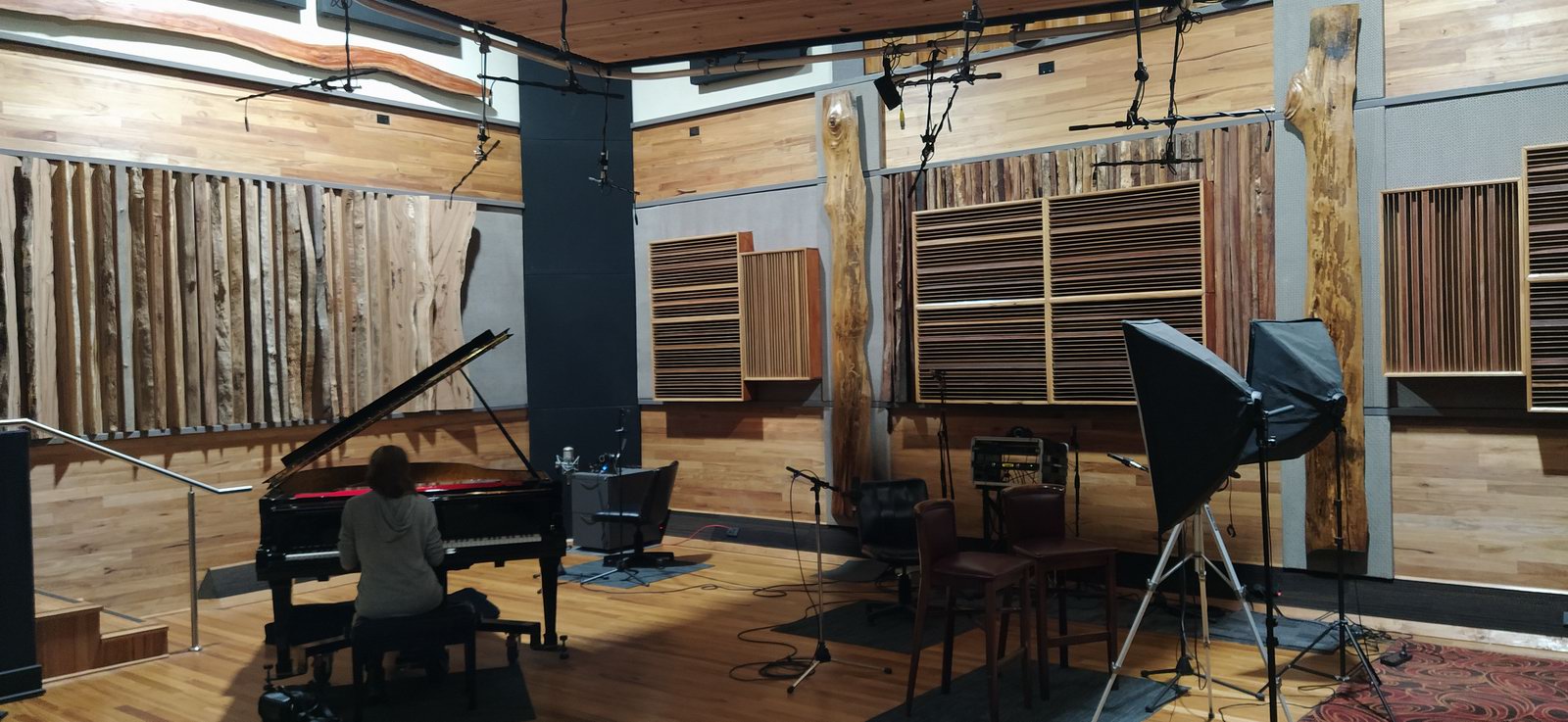

Daughter plays a very fancy piano
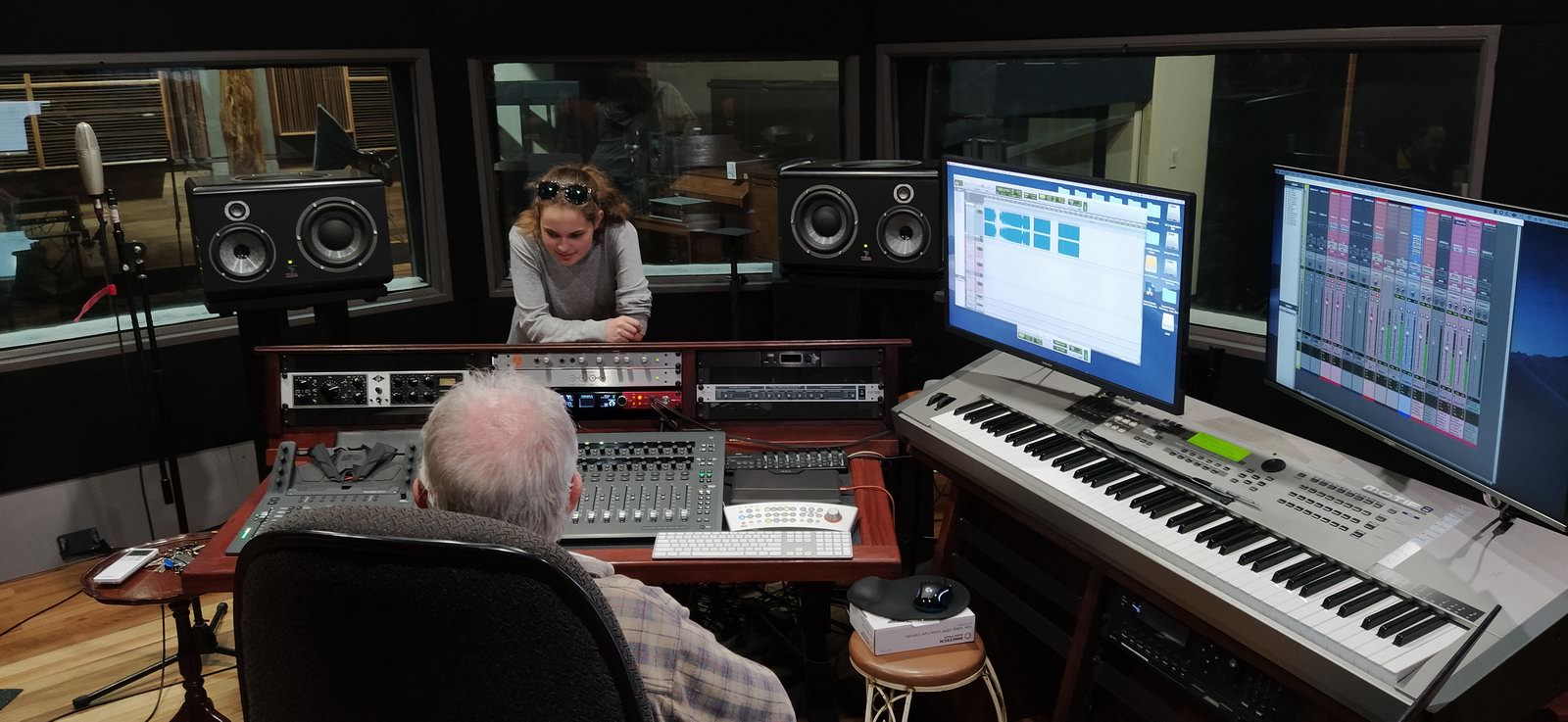

Daughter and her grandad in the control room

Monday, 21 September 2020

Sad songs

Music evokes emotion, that is kinda the point. There are some really sad songs, like Eric Claptop's "Tears in Heaven" about loss of a loved one, or Harry Chapin's "Cat's in the Cradle" about an awkward father/son relationship.  There are however only three songs I can think of that have ever brought me to tears.

Mike + the Mechanic's "The Living Years" is one of them, about death and regret. It did have a little bit of hope in the end.  Pink Floyd's "The Final Cut" is about depression leading to attempted suicide.  Yikes, that one doesn't have any hope.

But the last one, which I reckon has taken my sad song top place, is from the most unlikely of places - Rebecca Sugar's Steven Universe's "Drift Away".  When the animated kid's movie came out last year I watched it with the kids, and when that song came on I couldn't believe it, I lost composure and teared up.  It is a song about rejection and loss of innocence that leads to the main protagonist's anger/revenge/insanity. The way the movie portrayed it certainly added to the sadness, but the music itself and the lyrics, whoa.

My eldest daughter learned to play it on the ukulele when it came out, I come across it again the other day, and still whoa, teared up. In order to understand why, I looked into it and noticed a few things:

  • 6/8 time signature is a good choice for sad songs, not quite a dirge but you can't bop to it;
  • An unusual verse chord progression G-G7-C-Cm which equates to establish-tension-release-sad really adds to the lament feel; 
  • Melody off beat, has that slow falling-behind sad feel;
  • Keeping the verse range down low, then having the chorus up high, for despair-frustration-despair;
  • A nice bridge that leaves the established feel, offering some relief, but then takes you straight back to where you were but sadder;
  • Well written poetic lyrics, good imagery, music alone could make you cry but effective lyrics certainly help;
  • It has a slightly Pink Floyd/Roger Waters feel with a hint of psychedelic era The Beatles, I would say the author is a fan.

This song is masterfully crafted and achieves its goals, my hat is off to the writers. During my obsessive research into it I of course arranged it for solo guitar, watch this space.

I have listened to it enough now that the sadness impact has been dulled - but like "The Living Years" and "The Final Cut" - if I hear them infrequently, whoa. Emotionally manipulative song writers! Grr! :-)  Watch it here https://youtu.be/lRS2ciJ5rOk

JAW

Saturday, 29 August 2020

What's happening August 2020

Quiet month on the guitar front, I've recently spent time purchasing a second hand car with manual transmission, fixing it up/servicing it and teaching my eldest daughter how to drive it...

I play "Sweet child of mine" through almost every day, it is locked in.  Most of my arrangements go from development stage to learning stage through a brief period of tweaking.  I add in extra notes, fiddle with the structure, play with it until it feels release-worthy. All done now, just practice and get ready for release!

Patreon has inspired me, I have another piece or two for release next month.  It is quiet there too, no new members for a while, but if you don't produce content madly that is expected!  Although I had begun drafting my "How to play Jawmunji's tabs" last month I have made no further progress. I need to get excited about it again, it is going to be just as important work as the tabs themselves!

JAW

Friday, 31 July 2020

What's happening July 2020

2024 UPDATE: My tabs have finally found a legitimate home at Jawmunji's Paidtabs


JAW
---


About a month ago I launched my  https://patreon.com/Jawmunji Patreon page.  I didn't do it with any trumpet blasts or fanfare, because I don't think there is enough content on there juuust yet.  But seven people have pledged support which both surprised and pleased me! I've done a lot of work over the years putting together sheet music to go with my arrangements, and it's inspirational to know that people find them useful enough that they would support me with their hard earned cash. I'm going to publish at least one new or "refurbished" one per month for the foreseable future.

In August I will be releasing "Losing My Religion" which is a great introduction to fingerstyle chord flicking, and "Wish You Were Here" which is such a good song I'm calling it essential to your fingerstyle repertoire. I also plan on making a "How to play Jawmunji's tabs" video which will deal with a few concepts and ideas that can't be explained from just sheet music.  Watch this space! Other than being excited and motivated about getting more arrangements onto Patreon, I am still practicing "Sweet Child Of Mine". It is challenging, it's not one that I'll be able to play cleanly and easily, but it is a lot of fun.  And it's one of those songs that casual listeners won't expect and yet be delighted to hear in fingerstyle :-)

Good playing to you all!

JAW

Saturday, 20 June 2020

Tabs for Patreon

2024 UPDATE: My tabs have finally found a legitimate home at Jawmunji's Paidtabs


JAW
---


Yep, I have set up a Patreon account and I will be posting all my tabs there.  Why JAW, why?  I have lost inspiration for making tabs to give away for free for a while now.  Just felt like so much work and I put them out there and hear no more of it.  But, I like creating tabs, it is part of my arranging work flow... Could I sell them? Well yes, but I don't own the copyright so I'm not really entitled to.  But if I gave them away to people who support me on Patreon, that doesn't seem quite the same.  And Patreon, $3, download whatever you want and walk away, or stay and get new ones and updates, well, that's a bargain! Once upon a time people used to donate to me on paypal, but I haven't seen one in years.

Having people support me on Patreon is inspiring.  I like to share my work!  I have agonised over this for a long time, I first mentioned it back in 2017 and I'm still not sure it is the right thing to do, but I can tell you one thing - it certainly got me cracking on my back catalogue of tabs! I have been tidying up previous ones and releasing them for Patreon supporters.  They are coming out really nice, much nicer than the old ones. I need to write up a general "Playing Jawmunji Tabs" instruction sheet - reminder to self.

But to really make people think they are getting something worthwhile for their initial $3, I decided to make my top watched youtube video from the past year into beautiful new tabs.  Which are:

1 The Ecstasy of Gold (done) 
2 Pachelbel Canon in D
3 Wish You Were Here
4 Losing My Religion
5 Always Look on the Bright Side of Life
6 The Chain
7 California Dreaming (not mine to post)
8 Goodbye Blue Sky/Anybody Out There?
9 Rock-a-bye Your Bear / Where's Jeff?
10 Without You
11 Here Comes the Sun
12 Funky Town
13 Reckless
14 Never Tear Us Apart
15 Telephone Line
16 1979

Yah! Getting there! Find my Patreon here: https://patreon.com/Jawmunji

Tuesday, 9 June 2020

What's happening June 2020

Three days, three videos.  Well, I recorded them all in one sitting, but processed them over three nights. "The Logical Song", a re-play after my original recording was taken down 12 years ago. "You're So Vain" which I've kept short and sweet, and then finally the epic "Band On The Run" which is based on Jake Reichbart's arrangement he posted in January. I mentioned to him at the time how great it was and that I was going to try it, he emailed me and said the tab will soon be available, but I'd already started making it my own arrangement/transcription. Ah, I've sent Jake a few bucks in the past from his live streams, I'm sure he won't mind!

I have been practicing a number of other songs to polish them for YouTube, I'm still targeting 100 videos. In the recording session I set up two cameras and two mics. Had a lot of dramas. My house wasn't particularly quiet, the kids and the missus were chatting, but you can only hear them in the really quiet sections. But I had two flat batteries during the session, one full memory card, and I forgot to turn one of the mics on for the whole session. Argh! But I managed to salvage the three videos.

Because I use my DSLRs for "high quality" videos, I don't get to see my framing while I'm playing. Maybe modern cameras you can? Dunno. I use a mirror on a stand to get it initially right, but because I like to frame tight sometimes I move and go a bit out of frame. The last video was not so good for framing.

First song and second song I botched the endings in my takes, but because they have distinct song parts, I played the endings again, and spliced them in.  Because I have two cameras, I can switch between cameras in the final video and you don't know the take is spliced. I played each song around three times, picked my favourite take, and then punched out a few missed notes from the other takes.  I do this to most of my videos, I'm a functional perfectionist which means that I have to fix errors but I'm not afraid to post even with a few errors still in there. Around 20 mins to record, around 2 hours to post edit and produce.

Time to work on the next songs on my punchlist!  Really enjoying a Naudo inspired version of "Sweet Child of Mine", I'm a bit sick of "If You Leave Me Now" but it's good so I should finish it. "While My Guitar Gently Weeps" is going well but I'm also a bit worn out with it.  That's the problem - if I can get a good arrangement down and learn it before I get bored of it, I will record it!  I've got all these songs at 80-90% not ready to record, and it feels like work! Ha ha!

JAW

Sunday, 10 May 2020

More musings on Musescore - my Musescore tips

In my efforts to convert all my scores/tabs to MuseScore, I've got a few tricks that I better write down for you and for me so I don't forget. MuseScore makes my tabs look so pretty:


But they don't look like that out of the box, so here's a few things I do so that my tabs look this great!

Note: This was originally written for Musescore Version 3, I have updated for a few differences in Version 4.

Stave Properties

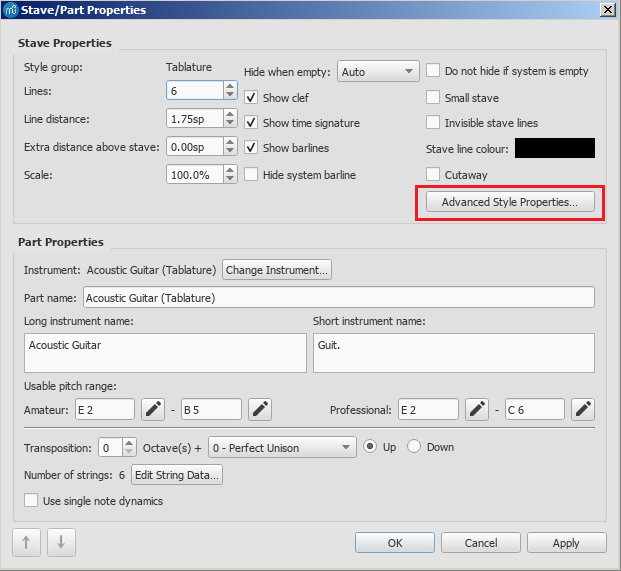
Right click in any bar and select Version 3 Stave Properties Version 4 Staff/Part Properties. I set up the instrument to be Acoustic Guitar (Tablature) and then tweak the defaults. If you need to go to Drop D or other tuning do that in Edit String Data, otherwise press Advanced Style Properties.


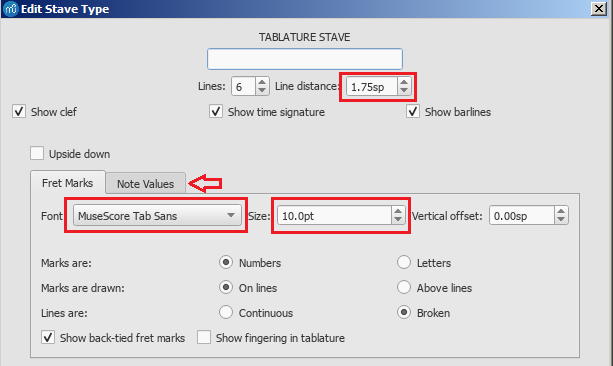
In Advanced Style Properties change the font to "MuseScore Tabs Sans" font size 10pt. Nobody ever complained for having a big clear font. However the spacing gets big so change the line distance to 1.75sp.


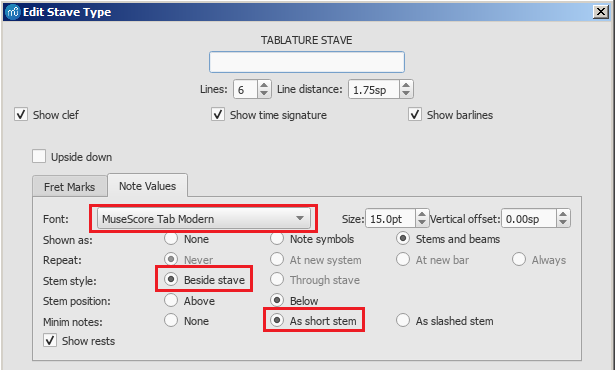
Now click on "Note Values".I set Font to "MuseScore Tab Modern" which gives you a plain "TAB" at the start. I then set the Stem style to Beside stave (which defaults to below) which is clearer than the tab numbers having stems. I set Minums "As short stem" as I find the double slash looks a bit cluttered. That's it for the Stave.


It's all XML!

A MuseScore file is of type .mscz which basically means "MuseScore Zipped", and inside the zip is a .mscx file which basically means "MuseScore XML", which is simply a text file that the program reads and edits...but being text, you can also read and edit it. Or hack it with tools and stuff. But generally XML implies good standards and techniques, one of them is the XML properties.

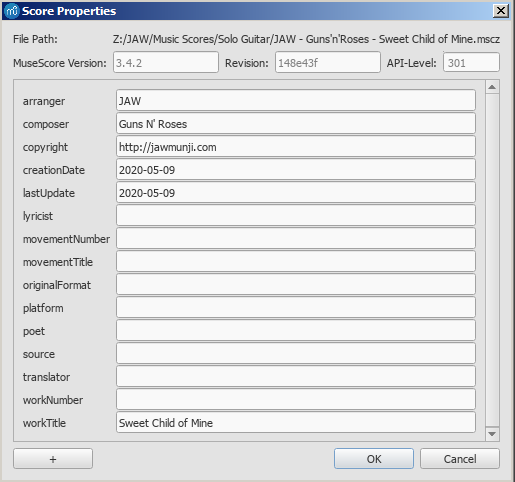
From File select Score Properties, I go for workTitle, arranger, composer, creationDate and copyright is my website. I also add a field called lastUpdate because I like to know when I created a tab, but also the last time I made some changes on it. File timestamps are not always meaningful.


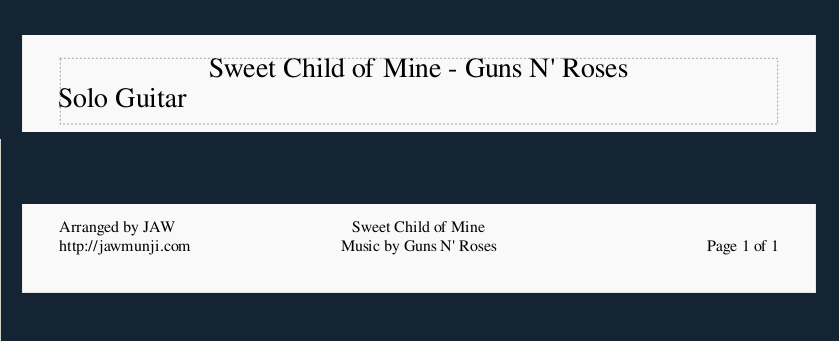
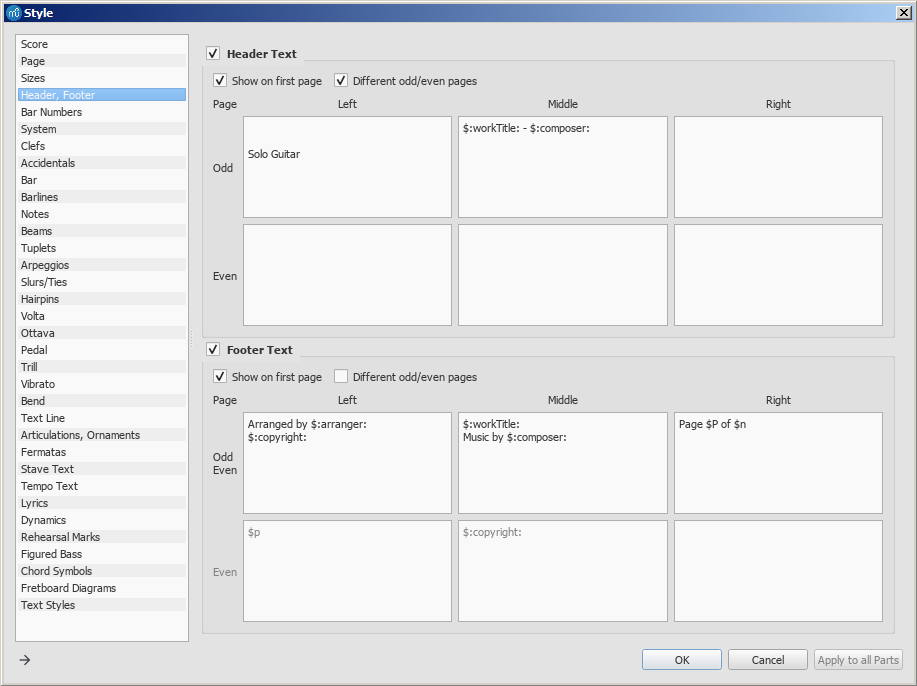
What this gets you other than the files being index-able by "systems" is that you can have a page template that refers to these properties. So the header and footer of my tabs all have the following, repeated on each page.


Templates

XML naturally lends itself to templates. There are sooo many style options in MuseScore it is ridonculous. I had used MuseScore for a few years before I understood 10% of them, and I still only understand maybe 15% now. Go into Format->Style and edit away, once you are done you go Format->Save Style, and in the future you can apply your template to any other score with Format->Load Style. But this is only the styles - the previous discussions on Staves isn't part of a template, as with a few other things, I haven't quite got my head around how that works. Advanced Styles appear to have a template but there does not appear to be a built in editor, you may have to hack the XML. But don't, the easiest way to create a new score with the same normal/advances styles is to save-as, rename, delete all, and begin from there!

But back to template styles, here are some important ones, in the Format->Style dialog:
  1. Page - Music top margin, Music bottom margin. Similar to above, tweak to squeeze more out of a page.
  2. Version 3:Page - Min. and Max. system distance. This the distance between the first row of bars and the next row, that is, "system". I try to keep my tabs single page so I will tighten it if I'm chasing just one more system without spilling onto a second page. Tweak both these numbers and watch the results!
  3. Version 3: Bar - Spacing Version 4: Measures - Spacing ratio. Version 4.5: Spacing - Horizontal spacing - Spacing ratio and system density. These are great number to tweak to get your score onto one page, or if it's just two big to space it out nicely for two pages.
  4. Lyrics. Traditionally they go underneath, I have stuck with that. Lyrics are important because they help get the melody feel of the arrangement. Use Min. bottom margin and top margin to help with your spacing. Version 3: Use Text Style -> Lyrics Odd Lines/Even Lines Y spacing to get the tightness you want - also applies to Chords. Version 4: Format->Style->Lyrics and adjust Min margins and Min distance to cram the words up if you are aiming for one sheet.
  5. Additionally, in Format->Page Settings you can set Scaling Staff space to a lower number to really squeeze more out of a page.
And here's how I get my header and footer:


Other Good Stuff

  • Version 3: The best sound for play back is "Acoustic Bass", go to View->Mixer and in the Sound specify Acoustic Bass.
  • Version 4: The best sound for play back is a soundfont. Download a Soundfont for Guitar, this super simple nylon guitar soundfont is okay. Copy the .sfz or .sf2 file into the Musescore Soundfont folder, (is set in Edit->Preferences->General->Folders) and then copy the Soundfonts folder into a file explorer window. Restart Musescore, then open your sheet, View->Mixer, find your instrument, click Sound->Soundfonts and your soundfont will be there.
  • Version 3: Get a good Swing feel by dropping the text type "Swing". You can then adjust the sound with Properties->Swing Settings although the default of Quaver/60% is great. Version 4: has the same but in Format-Style-Score.
  • Add a Capo: 
    Version 3: place any text on the first note (eg "Capo at x") then go to Properties -> Capo Settings
    Version 4 (early): place text as per version 3 right click -> staff text properties -> Capo Settings and set the capo you are chasing. 
    Version 4 (later): In Palettes search for Capo and then place Guitar->Capo
  • Percussive notes, with an "x" head,
    Version 3: press shift-x,
    Version 4: click on the note, click on properties, change the notehead type to "x".
  • Version 4: Set Edit->Preferences->I/O->Buffer size to 4096 to get smoother sound playback.
  • Version 4: Turn of chord playback by clicking in the cog in the top right and untick "Play Chord Symbols". Note that this is an application setting, not a score setting.  To force the score to never play a chord you have to click on each chord symbol, properties, untick Play.
  • Version 4: the beam height of the notes underneath the stem are sometimes a bit long.  There doesn't seem to be a way of setting this in the style, but if you ctrl-A to select everything, then click on Note, then click on Beam, then click on Show More, you can then decrease the height of the beam at the start and finish.

That's it for now. I will have to pop up some more tips about using MuseScore, I had a bit of a learning curve from PowerTab, and to be honest, I'm still not that fluent. MuseScore for me is reverse Polish notation - I think of the note pitch first then the note duration rather that the other way around so I find myself pressing escape and "n", "q" or "w" a lot...